Teacher Demonstration
Use the live model as a shared screen demonstration before students try their own predictions and observations.
Explore Clock Teaching Model as an interactive EJS simulation for Measurement.
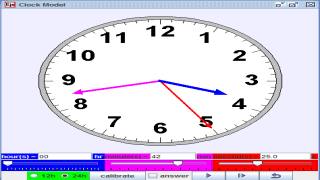
Use the live model as a shared screen demonstration before students try their own predictions and observations.
Open the simulation, adjust the controls, and compare what changes on screen before answering the concept-check questions.
What time is shown by the hour hand and minute hand, and should it be read as minutes past or minutes to the hour?
Read the long hand first. Count around the 60 ticks or use the numbers as groups of five minutes.
Look at the short hand and decide which hour it has passed or which hour it is approaching.
For minutes 1 to 30, read the time as minutes past the hour. For minutes after 30, read how many minutes to the next hour.
Compare your reading with the model's word output, such as o clock, minutes past, or minutes to.
Use this as a clock-reading routine: minute hand, hour hand, then words. The model is strongest when students explain how the hand positions lead to the spoken time.
Ask: Which hand tells the minutes? Why is the hour hand between two numbers? When do we change from 'past' to 'to'? How do 60 ticks become groups of five?
Pause at awkward times such as 7:25, 7:35, 12:00, and 3:45. Ask students to say both the numerical time and the spoken form before checking the model output.
The source code includes variables for hour count, 60 ticks, second hand angle, current hours/minutes/seconds, and word strings for 'o clock', 'minutes past', and 'minutes to'. Keep prompts tied to these clock-reading affordances.
These questions are generated from the topic and the concept illustrated by the simulation. Use them after students have explored the model.
Correct first attempts build a streak and unlock higher point multipliers on this device.
1. Which hand should usually be read first on this clock model?
2. What does each number on the clock face represent for minutes?
3. How should the hour hand be interpreted at 7:25?
4. When is 'minutes to' more useful?
5. What evidence should students cite from the model?
Unlocks after 3 correct concept-check answers on this page.
1. A clock shows the long minute hand on 6 and the short hour hand halfway between 3 and 4. What reading is strongest?
2. What feedback fits 'the number 9 on the clock always means 9 minutes'?
3. How should students decide between 'minutes past' and 'minutes to'?
4. A student reads 10:50 as '50 minutes past 10' but the model says 'ten minutes to eleven'. What is the expert explanation?
5. What makes a clock-reading explanation expert-level for this model?
Anonymous activity shows this resource is being discovered, revisited, and used by learners in different places.
Country or region is inferred anonymously from server location headers when available. No names, accounts, or IP addresses are shown.